Get omnichain UX 2026 right
Before you begin building, you must define the exact user journey. Omnichain UX design 2026 shifts from fragmented blockchain interfaces to a unified, invisible user experience. Your team needs to map the entire flow first, ensuring that asset transfers and state changes happen without confusing the user.
Next, select your infrastructure stack carefully. You will need an abstraction layer that handles cross-chain messaging and asset bridging automatically. If you build this yourself, you inherit the security risks of every connected chain. Using a standardized middleware protocol reduces this attack surface significantly.
Finally, establish your error handling strategy. Cross-chain transactions are not instantaneous. Your interface must clearly communicate pending states, potential delays, and failure reasons. If a bridge fails, the user should have a clear path to recovery without losing funds. This clarity is what separates a professional product from a risky experiment.
How to build cross-chain UX that feels native
Cross-chain UX design 2026 represents a shift from fragmented blockchain interfaces to a unified, invisible user journey. Instead of forcing users to manually bridge assets or switch networks, the best omnichain solutions handle the complexity in the background. This section walks you through the practical steps to implement this standard.
Start by identifying which chains your users actually use. Don’t assume Ethereum is the only path. Map out where assets originate, where they need to go, and which intermediate chains might be involved. This mapping reveals the friction points—like waiting for confirmations or paying high gas fees—that your UX must solve. Use a simple flowchart to visualize these transitions before writing any code.
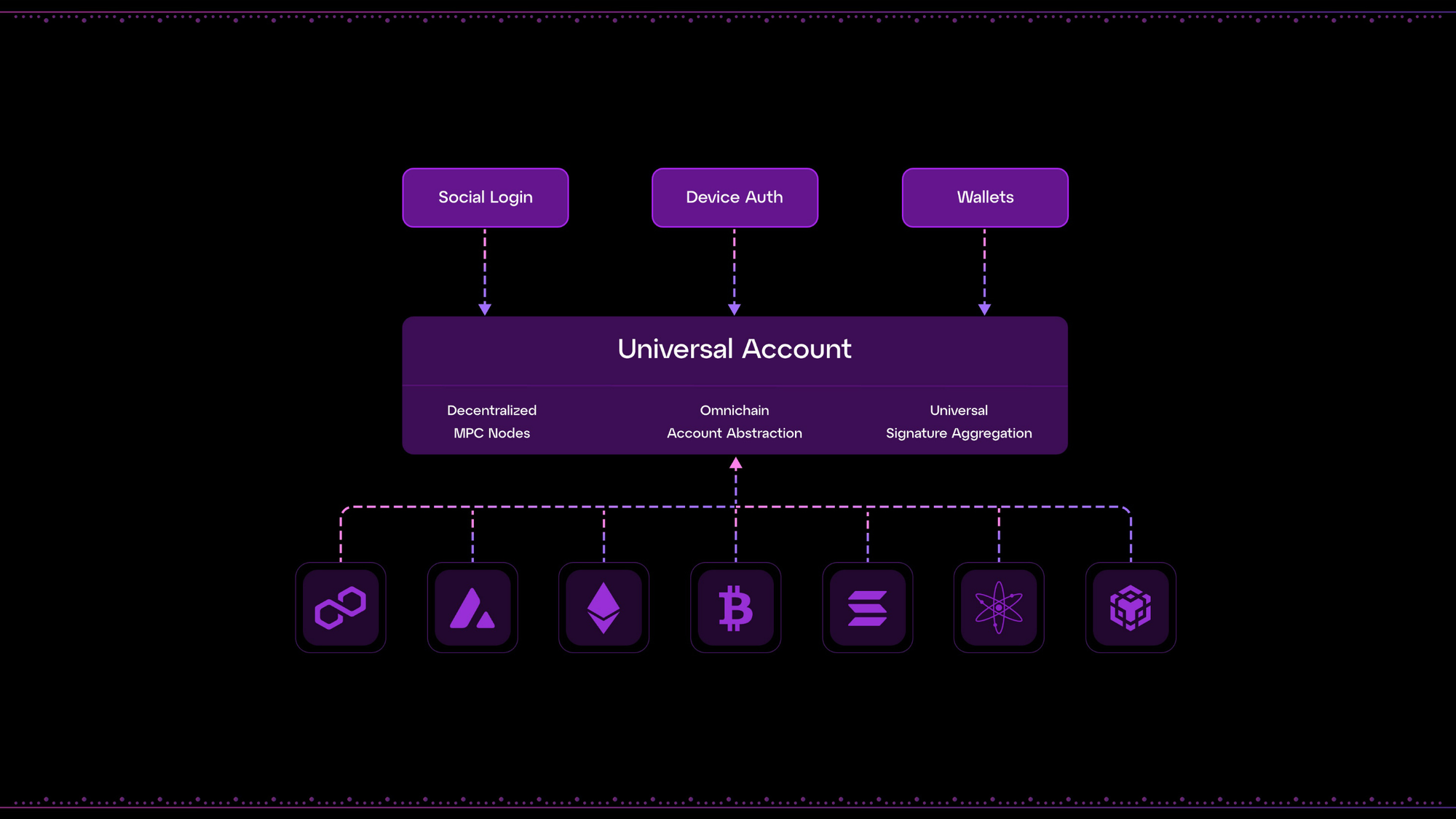
Choose a protocol that handles the cross-chain messaging and asset movement. Look for layers that support account abstraction, allowing users to pay transaction fees with any token, not just the native gas token of the destination chain. This abstraction is critical for a seamless experience, as it removes the “which network am I on?” confusion that often causes users to abandon their transactions.
Your interface should never ask users to confirm a “bridge” action explicitly. Instead, design a single “Swap” or “Transfer” button that works regardless of the underlying chain. Provide clear status indicators that show progress without technical jargon. Avoid terms like “liquidity pool” or “relayer.” Use plain language like “Processing” or “Almost there” to keep the user oriented without overwhelming them with blockchain mechanics.

Cross-chain transactions are more complex than single-chain ones, so failures are more likely. Design your UI to handle timeouts, failed relays, or insufficient liquidity gracefully. Instead of showing a generic error code, provide actionable steps: “Transaction failed due to network congestion. Try again in 5 minutes.” Offer a clear way to cancel or refund if a transaction gets stuck, ensuring users feel in control even when things go wrong.
| Feature | Standard Cross-Chain | Omnichain UX |
|---|---|---|
| User Action | Click bridge, then swap | Single click transfer |
| Gas Payment | Must have native token | Pay with any token |
| Network Awareness | User must switch chains | Chain switching is invisible |
-
Map user asset flows across all target chains
-
Select an abstraction layer with account support
-
Design single-action interfaces for multi-step processes
-
Implement clear, non-technical error messaging
Common Mistakes in Cross-Chain UX Design
Even with sophisticated bridging infrastructure, poor user experience remains the primary barrier to omnichain adoption. Users do not care about the underlying interoperability protocols; they care about whether their assets arrive safely and quickly. When the interface fails to communicate state clearly, trust evaporates. Below are the most frequent errors developers make when building cross-chain experiences.
Ignoring Transaction Latency Feedback
Users perceive delays as failures, even if the bridge is functioning correctly. A common mistake is hiding the transaction status behind a generic "Processing" spinner without explaining why it takes time. Different chains have different block times and finality requirements. L2s might need several seconds, while moving to a mainnet can take minutes.
Instead of vague loading states, provide real-time progress indicators. Show which step is happening: "Broadcasting to Source Chain," "Waiting for Finality," or "Crediting Destination Chain." This transparency reduces support tickets and anxiety. If a transaction stalls, offer a clear path to check the status on a block explorer rather than leaving the user guessing.
Poor Gas Fee Abstraction
Cross-chain transactions often require gas on both the source and destination chains. Failing to account for this creates a broken flow where users run out of native tokens mid-transaction. A robust UX handles "gasless" transactions on the destination side or clearly prompts the user to top up their wallet before initiating the bridge.
Do not assume users hold the native token of every chain they intend to use. Offer prepaid gas vouchers or abstract the fee collection into the bridge fee itself. If the user must manually swap tokens first, make that a seamless, one-click action within the same interface, not a redirect to a separate DEX.
Inconsistent Error Handling
When a bridge fails, the error message must be actionable. Generic errors like "Transaction Failed" are useless. Users need to know if the issue is network congestion, insufficient funds, or a protocol-specific limit. Provide specific guidance: "Insufficient ETH for gas" or "Bridge limit reached for this hour."
Avoid silent failures. If a transaction reverts, ensure the UI reflects the correct state immediately. Do not leave the user in a pending state while the backend retries. Clear, immediate feedback allows users to correct the issue and retry without losing confidence in the platform.
Omnichain ux 2026: what to check next
Here are the most common questions about the state of cross-chain interfaces and the industry events shaping them in 2026.
No comments yet. Be the first to share your thoughts!